


MySpot Carrier
4.1363.00 Reviews
App Specs
- Version
- 2.21.0
- Updated On
- License
- Free
- Downloads
- 100,000+
- Developer
- Red Technologies, LLC
- Categories
- Auto & Vehicles
- Platform
- Android, iOS
Screenshots
 Analysis by AppCompare
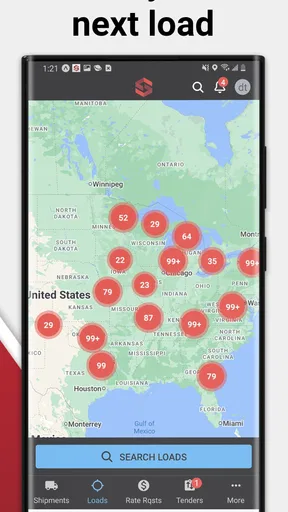
I’d first clear up an important point before anyone installs it: MySpot Carrier is built for freight carriers managing loads, not for households tracking online shopping parcels. That distinction changes what the app is useful for. Its focus is work in the vehicle: finding load opportunities, handling delivery paperwork, keeping load details organized, and sharing a location update. If you drive or coordinate carrier work, that is a much more relevant starting point than expecting a parcel calendar.
A work tool on a shared phone
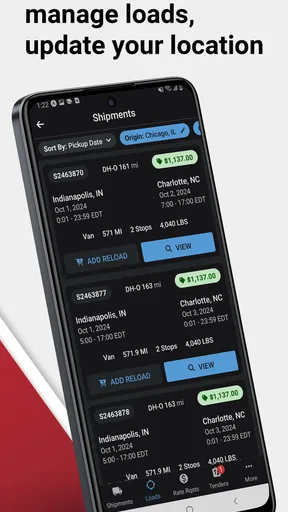
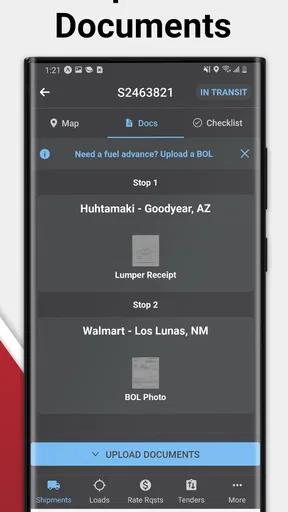
For a small carrier team, one realistic use is a driver checking the day’s available loads, accepting or managing a job, and submitting proof of delivery after completing it. A dispatcher or another person helping with the business may need to coordinate around the same shipment, but the app should be treated as a work account rather than a shared household tracker. I would keep the driver’s work access separate from personal apps and avoid passing a signed-in phone around casually.
That separation matters especially when a phone is shared between work and home. Load information and location updates are tied to a professional task, so another household member should not assume they can browse or manage them just because they use the same device. Before handing the phone to someone else, I’d sign out if that is available in the account workflow, or at least lock the device and avoid leaving the app open. The app’s purpose is practical coordination, not family location sharing.
Set expectations before the first load
The listing identifies the app as a free auto-and-vehicles app from Red Technologies, LLC. It has an average rating of 4.5 from around 3,400 ratings, with more than 100,000 installs. It is rated for Everyone, but that age label is not a recommendation for children to use a carrier work account. I’d regard it as suitable for adult drivers and dispatchers doing a job, with access controlled by the person or business responsible for the account.
It was released on October 14, 2020, and the current version is 2.12.0, with Android 7.0 as the minimum OS requirement. That makes checking device compatibility a simple first step if you’re setting up an older work phone. I would also test the basic work flow before relying on it for a time-sensitive run: make sure you can access the load board, understand how load management is presented, and know where the proof-of-delivery submission happens. A quick test is more useful than discovering a sign-in or device issue after a delivery is complete.
Coordination without mixing responsibilities
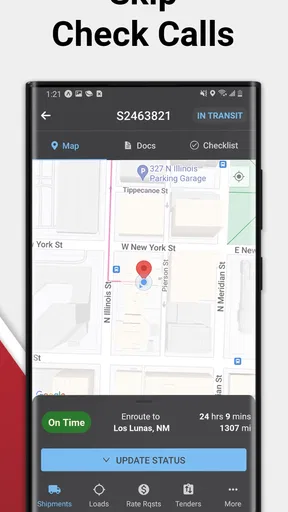
The location-update function is useful to think of as operational information, not a general-purpose live map for friends or family. It can help a carrier keep a work process current, but location sharing should be deliberate: turn it on when it serves the load workflow, understand who needs that information, and avoid treating it as an always-on household feature. If you are a driver, I’d check the app’s behavior and your company’s expectations before a trip rather than assume how or when updates are sent.
For a family member helping with paperwork or dispatch, the better arrangement is usually a clear handoff of specific tasks, not shared access to every part of the driver’s account. One person can handle the load search or coordination while the driver focuses on the road, then the driver can submit delivery documentation when safely stopped. This keeps the work moving without encouraging anyone to interact with the phone while driving. A carrier app can support coordination, but it does not replace a clear call, message, or agreed process between the people involved.
Worth Reading Before You Choose

EA SPORTS FC Mobile 26 Is a Bigger Football Game, but It Takes Time

Flipboard Shows What News Apps Must Do Beyond the Feed

Switching to Android Auto Means Rethinking Your Driving Routine

Google Calendar Makes a Crowded Week Easier to Manage

Ludo King Makes the Most of the Minutes Between Plans

Baby Panda World Brings Quick Play to Modern Phones, but Its Game Library Feels Busy
Where it fits, and where I’d look elsewhere
Compared with a general navigation app, MySpot Carrier serves a different purpose: it is centered on freight work and load handling rather than turn-by-turn directions. Compared with a broad business spreadsheet or a shared message thread, a dedicated carrier app can keep load-related actions closer together, though it still depends on the carrier’s workflow and the information available to the user. If your main need is route planning, household package tracking, or a shared family calendar, I’d choose a tool designed for that job instead.
It is most promising for carriers who want a mobile route into load-board tasks and delivery paperwork, especially when they are already comfortable completing work from a phone. It may be a poor fit for someone who expects a consumer parcel tracker, needs detailed navigation, or does not have the account access required for carrier work. I would also avoid making it the only record of an important delivery until I know how the business stores and retrieves submitted documents. Keeping a separate, approved recordkeeping process during the learning period is a sensible precaution.
Getting Started with MySpot Carrier
First things first, downloading and setting up MySpot Carrier is as smooth as it gets. Whether you're on Android or iOS, the app is available on both platforms, so no worries there. Once you install it, you’re greeted with a clean, intuitive interface. It's clear the developers prioritized user experience because everything is laid out in a way that just makes sense.
Features That Stand Out
What I love most about MySpot Carrier is its robust feature set. You can track multiple shipments in real-time, which is super handy if you're like me and have several packages on the way at any given time. The real-time notifications are a lifesaver. I mean, who doesn’t want to know exactly when their package is going to arrive?
Another cool feature is the delivery calendar. This nifty tool lets you view all your upcoming deliveries in one place. It’s like having a personal agenda for your parcels. Trust me, this comes in handy during the holiday season or when you're doing some intense online shopping.
User-Friendly Interface
Let's talk about the interface for a moment. The app’s design is sleek and modern, with an emphasis on simplicity. You won't find yourself getting lost or confused here. Everything is where you expect it to be, and the navigation is buttery smooth. Even if you’re not tech-savvy, you’ll find your way around in no time.
The ability to customize notifications is another big plus. You can set alerts for when a package is shipped, out for delivery, or delivered. This level of personalization ensures you’re never left in the dark about your deliveries.
Security and Privacy
In today’s world, security and privacy are paramount, and MySpot Carrier takes this seriously. The app uses encryption to protect your data, so you can rest easy knowing your information is safe. Plus, they have a transparent privacy policy that’s easy to understand, which is a big win in my book.
Room for Improvement
Of course, no app is perfect, and there are a few areas where MySpot Carrier could improve. For instance, while the app supports most major carriers, a few smaller ones are missing from the list. It would be fantastic to see these added in future updates. Also, although the app is generally fast, there can be minor lags when you're managing a large number of shipments.
Another feature I'd love to see is integration with smart home devices. Imagine asking your smart speaker, "Hey, when's my package arriving?", and getting an instant response. That would be a game-changer!
Final Thoughts
All in all, MySpot Carrier is a stellar app for anyone looking to streamline their package tracking. It’s user-friendly, feature-rich, and reliable. While there’s room for improvement, the positives far outweigh any minor hiccups. If you're tired of juggling multiple tracking numbers and want a single hub for your deliveries, give MySpot Carrier a shot. You won't regret it!
Pros
- User-friendly interface
- easy to navigate.
- Efficient route optimization saves time.
- Real-time tracking of shipments.
- Supports multiple languages.
- Customizable notifications.
Cons
- Limited offline functionality.
- Occasional app crashes reported.
- Frequent updates required.
- No dark mode available.
- Limited integration with third-party apps.
FAQs for MySpot Carrier
What is MySpot Carrier and what does it offer?
MySpot Carrier is a logistics and transportation app designed to streamline the shipping process for both businesses and individual users. It offers features like real-time tracking, route optimization, and secure payment options. The app aims to enhance efficiency and transparency in managing deliveries, making it a valuable tool for carriers and clients alike.
Is MySpot Carrier available on both Android and iOS?
Yes, MySpot Carrier is available for download on both Android and iOS platforms. Users can easily find the app on the Google Play Store for Android devices and the Apple App Store for iOS devices. This ensures broad accessibility regardless of the smartphone or tablet being used.
How does MySpot Carrier ensure the security of transactions?
MySpot Carrier employs advanced encryption technologies to protect user data and transaction details. The app integrates secure payment gateways to ensure that all financial transactions are conducted safely. Regular updates and security audits are performed to maintain a high level of protection against potential threats.
Are there any costs associated with using MySpot Carrier?
While downloading MySpot Carrier is free, the app may include in-app purchases or subscription fees for premium features. These could include enhanced tracking capabilities, priority customer support, or other advanced functionalities. Users can choose to use the basic free version or upgrade based on their requirements.
Can MySpot Carrier be used for international shipments?
Yes, MySpot Carrier supports both domestic and international shipping services. The app provides tools for managing customs documentation and offers real-time updates on international shipments. Users should check the app's specific country lists to ensure coverage and compliance with local regulations.


